![[Ap Yazılım] Çoklu Dil Sekmeleri](/data/resource_icons/0/73.jpg?1791913530)
- Uyumlu Xenforo Sürümleri
- 2.3.X
- Entegre Kaynaklar
XenForo forumunuz için geliştirilen [Ap Yazılım] Çoklu Dil Sekmeleri, uzun ve karmaşık çok dilli içeriklerinizi modern, şık ve düzenli sekmeler haline dönüştüren premium bir arayüz eklentisidir. Zengin metin editörüne entegre olan gelişmiş altyapısı sayesinde, farklı dillerdeki metinleri alt alta yığmak yerine, bayraklı ve animasyonlu sekmeler halinde sunarak kullanıcılarınıza kusursuz bir okuma deneyimi yaşatırsınız.
 Öne Çıkan Özellikler
 Gelişmiş Sekme Yapısıİçeriklerinizi tek bir alanda, yan yana sıralanmış şık butonlar ve sekmeler halinde düzenli bir şekilde görüntüleyin, sayfa kalabalığının önüne geçin.
 Akıllı Bayrak ve Dil EşleştirmeSistem, girdiğiniz etiketlere göre ülke bayraklarını (SVG formatında) ve dil isimlerini otomatik olarak tanır, sekmeye entegre eder. Sizin ekstra bir görsel eklemenize gerek kalmaz.
 Modern ve Pürüzsüz AnimasyonlarSekmeler arası geçişlerde içeriğe göre otomatik yükseklik ayarlaması ve yumuşak (cubic-bezier) animasyonlar sunar. Dar ekranlarda veya mobil cihazlarda çok fazla sekme eklendiğinde otomatik kaydırma (smooth scroll) butonları devreye girer.
 Evrensel Eklenti UyumluluğuYalnızca standart forum konularında değil; XenForo Resource Manager (Kaynaklar), DragonByte eCommerce, XenPorta ve diğer popüler 3. parti eklentilerin ürün/makale açıklamalarında da kusursuz çalışır.
 Gelişmiş Yetki ve İzin SistemiÇoklu dil sekmesi oluşturma yetkisini belirlediğiniz kullanıcı gruplarına özel olarak tanımlayabilirsiniz. Yetkisi olmayan kullanıcılar oluşturulmuş sekmeleri mükemmel bir şekilde okuyabilir, ancak kendi editörlerinde bu butonu göremezler.
 Otomatik Boşluk ve Düzen TemizleyiciEditörün otomatik oluşturduğu gereksiz satır sonlarını (<br>) ve boşlukları PHP seviyesinde arka planda temizleyerek tasarımın ve hizalamanın bozulmasını %100 engeller.
 Nasıl Kullanılır ve Çalışır?
Eklenti, kurulumun ardından zengin metin editörünüzün araç çubuğuna otomatik olarak bir "Dil Sekmeleri" (Dünya ikonu) açılır menüsü ekler. Bu menüden dil seçimi yaparak veya manuel olarak BB Kodlarını yazarak sistemin çalışmasını sağlayabilirsiniz. Arka arkaya eklenen dil etiketleri, sistem tarafından otomatik algılanarak tek bir sekme kutusu içinde birleştirilir.
Varsayılan Hızlı Etiketler: En çok kullanılan diller için sisteme entegre edilmiş doğrudan etiketleri kullanabilirsiniz:
Kod:
[LANG_TR]Buraya Türkçe içerik yazılacak[/LANG_TR] (Otomatik Türk bayrağı ve "Türkçe" başlığı ekler)


[LANG_EN]English content goes here[/LANG_EN] (Otomatik İngiliz bayrağı ve "English" başlığı ekler)


[LANG_RU]Русский текст[/LANG_RU] (Otomatik Rus bayrağı ve "Русский" başlığı ekler)
Dinamik Çoklu Dil Etiketi
[LANG=] Nasıl Eklenir?[/LANG][LANG=]Eğer listede olmayan farklı bir dil eklemek isterseniz, evrensel [LANG=] etiketini kullanarak sistemdeki yüzlerce dili anında çağırabilirsiniz. Eşittir (=) işaretinden sonra ilgili dilin uluslararası ISO kodunu yazmanız yeterlidir. Sistem bayrağı ve dili otomatik oluşturur:
Kod:
[LANG=de]Almanca içerik[/LANG] (Almanya bayrağı)
[LANG=az]Azerbaycanca içerik[/LANG] (Azerbaycan bayrağı)
[LANG=fr]Fransızca içerik[/LANG] (Fransa bayrağı) Ayarlar ve Yapılandırma
Eklentinizin kontrollerini XenForo admin panelinden kolayca yönetebilirsiniz.
 Kullanıcılara Gösterim Ayarları (İzinler):Hangi kullanıcı gruplarının bu sekmeleri oluşturabileceğini belirlemek için:Admin CP → Gruplar ve İzinler → Kullanıcı Grupları yolunu izleyin. İlgili gruba tıklayarak [Ap Yazılım] Çoklu Dil Sekmeleri başlığı altından kullanım yetkisini "Evet" olarak işaretleyin.
 Editör Buton Yöneticisi (Düzenleme):Editördeki açılır menünün yerini (örneğin Kalın harf ikonunun yanından alıp başka bir yere taşımak isterseniz) düzenlemek için:Admin CP → BB Kodu ve İçerik → Editör buton yöneticisi alanını kullanabilirsiniz.
 Neden [Ap Yazılım] Çoklu Dil Sekmeleri?
- Forumunuzda uluslararası, derli toplu ve premium bir görünüm sağlar.
- Uzun çeviri metinlerinin sayfayı kilometrelerce uzatmasını engeller.
- Zaman kazandıran otomatik bayrak ve dil tanıma altyapısına sahiptir.
- Göz yormayan, modern web standartlarına uygun geçiş animasyonları sunar.
- Performans odaklı, sunucuyu yormayan temiz bir kod yapısına (PHP + JS) sahiptir.

Developed for your XenForo forum, [Ap Yazılım] Multi-Language Tabs is a premium interface add-on that transforms long and complex multilingual content into modern, stylish, and well-organized tabs. Thanks to its advanced integration with the Rich Text Editor, you can display content in different languages as animated tabs with country flags instead of stacking translations vertically, providing your users with a seamless reading experience.
Key Features Advanced Tab StructureDisplay your content in a single area using stylish, horizontally aligned buttons and tabs. Keep your content organized and prevent pages from becoming cluttered.
Smart Flag and Language MatchingThe system automatically recognizes country flags (in SVG format) and language names based on the tags you enter, then integrates them into the corresponding tabs. No additional images are required.
Modern and Smooth AnimationsEnjoy automatic height adjustment based on content and smooth cubic-bezier animations when switching between tabs. When too many tabs are added on narrow screens or mobile devices, smooth-scroll navigation buttons become available automatically.
Universal Add-on CompatibilityThe add-on works seamlessly not only in standard forum threads but also in product and article descriptions across popular third-party add-ons, including XenForo Resource Manager, DragonByte eCommerce, XenPorta, and other popular extensions.
Advanced User Group PermissionsYou can grant permission to create multi-language tabs to specific user groups. Users without permission can still view existing tabs perfectly, but the corresponding button will not appear in their editor.
Automatic Whitespace and Formatting CleanupThe add-on cleans up unnecessary line breaks (<br>) and whitespace generated by the editor in the background at the PHP level, helping prevent layout and alignment issues.
How to Use and How It WorksAfter installation, the add-on automatically adds a "Language Tabs" dropdown menu (globe icon) to your Rich Text Editor toolbar. You can activate the system by selecting a language from this menu or by manually entering the BB Code tags. Consecutive language tags are automatically detected and combined into a single tab container.
Default Quick Tags: You can use the built-in tags for the most commonly used languages:
Kod:
[LANG_TR]Enter Turkish content here[/LANG_TR] (Automatically adds the Turkish flag and the "Türkçe" tab title)

[LANG_EN]English content goes here[/LANG_EN] (Automatically adds the British flag and the "English" tab title)

[LANG_RU]Русский текст[/LANG_RU] (Automatically adds the Russian flag and the "Русский" tab title)
How to Use the Dynamic Multi-Language Tag
[LANG=]If you want to add a language that is not included in the predefined list, you can use the universal
[LANG=] tag to access hundreds of languages supported by the system. Simply enter the language's international ISO code after the equals sign (=). The system automatically generates the corresponding flag and language label.
Kod:
[LANG=de]German content[/LANG] (German flag)

[LANG=az]Azerbaijani content[/LANG] (Azerbaijani flag)

[LANG=fr]French content[/LANG] (French flag)You can easily manage the add-on's settings through the XenForo Admin Control Panel (Admin CP).
User Group PermissionsTo specify which user groups can create language tabs, navigate to Admin → Groups & Permissions → User Groups. Select the relevant user group and set the permission under [Ap Yazılım] Multi-Language Tabs to Yes.
Editor Button Manager (Customization)To change the position of the dropdown menu in the editor—for example, to move it from beside the Bold button to another location—navigate to Admin → Content → BB code button manager.
Why Choose [Ap Yazılım] Multi-Language Tabs?- Gives your forum a polished, organized, and premium international appearance.
- Prevents lengthy translations from making pages unnecessarily long.
- Features automatic flag detection and language recognition to save time.
- Provides smooth, modern transition animations that are easy on the eyes and follow modern web standards.
- Uses clean, performance-focused PHP and JavaScript code designed to minimize server overhead.


XenForo 2 Arşivden ve manuel eklenti nasıl kurulur, nasıl güncellenir?
XenForo 2 için bir eklenti nasıl kurulur, nasıl güncellenir sorusuna bu kaynakta sizlere anlatmaya çalışacağım.Arşiv olarak eklenti yüklene bilmesi için config.php izni nasıl verilir?
Eğer sisteminiz etkin değil ise görselde gördüğünü hatayı alacaksınız.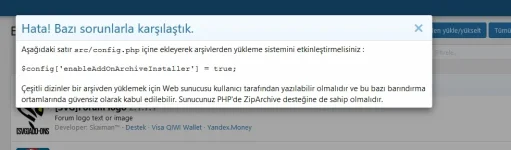
Eğer sunucunuzda
ZipArchive modülü yüklü ve etkin ise FTP/SRC/config.php açın ve en alt satırına aşağıdaki satırı ekleyin;$config['enableAddOnArchiveInstaller'] = true;Eğer hostunuzda ZipArchive modülü etkine değil ise şuna benzer...
![[Ap Yazılım] Multi-Language Tabs - English Patch](/data/resource_icons/0/74.jpg?1791914100)

![[Ap Yazılım] Core Library](/data/resource_icons/0/53.jpg?1774788910)


