![[Ap Yazılım] Everyone](/data/resource_icons/0/79.jpg?1793340229)
- Uyumlu Xenforo Sürümleri
- 2.2.X
- Entegre Kaynaklar
XenForo forumunuz için geliştirilen [Ap Yazılım] Everyone, forum üyelerinize tek bir komutla toplu olarak bahsetmenizi ve seçtiğiniz kullanıcılara otomatik bildirim göndermenizi sağlayan gelişmiş bir toplu bahsetme eklentisidir. Zengin metin editörüne entegre edilen akıllı komut tamamlama sistemi sayesinde kullanıcılarınız, mesaj yazarken @everyone komutunu kolayca kullanabilir. Gelişmiş yönetici seçenekleriyle hangi kullanıcıların bu özelliği kullanabileceğini, bildirimlerin kimlere gönderileceğini, hangi forumlarda aktif olacağını ve gönderimlerin nasıl işleneceğini ayrıntılı olarak belirleyebilirsiniz.
 Öne Çıkan Özellikler
 Tek Komutla Toplu Bahsetme
Forumunuzda tek bir @everyone komutuyla belirlenen kullanıcı kitlesine toplu bahsetme işlemi gerçekleştirin. Sistem, mesajın içeriğini işler ve uygun kullanıcılar için otomatik bildirim oluşturur. Komutun adını yönetici panelinden değiştirebilir, forumunuza özel bir kullanım biçimi belirleyebilirsiniz. Akıllı Editör Entegrasyonu
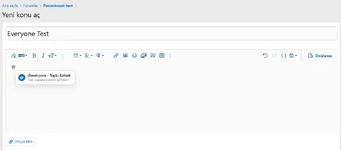
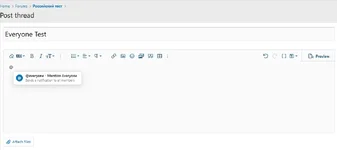
XenForo'nun zengin metin editörüne entegre edilen otomatik tamamlama sistemi sayesinde kullanıcılar @ yazdığında açılan öneri menüsünde Toplu Bahset seçeneği görüntülenir. Kullanıcılar bu seçeneği tıklayarak komutu kolayca ekleyebilir. Özelleştirilebilir Bahsetme Komutu
Varsayılan @everyone komutunu farklı bir komutla değiştirebilirsiniz. Örneğin, Türkçe forumlarda @herkes kullanımını tercih edebilirsiniz. Komutun büyük ve küçük harf duyarlılığını da yönetici panelinden belirleyebilirsiniz. Gönderim Öncesi Alıcı Sayısı
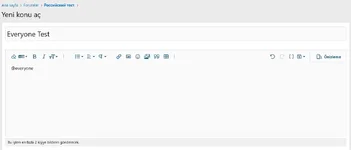
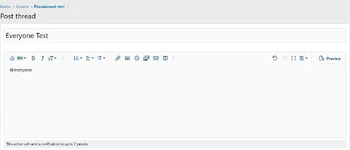
Toplu bahsetme işlemi gerçekleştirilmeden önce kaç kullanıcının bildirim alacağını görüntüleyin. Editörün altında gösterilen bilgilendirme mesajı sayesinde kullanıcılar, gönderim yapmadan önce işlemin kapsamını öğrenebilir. Gelişmiş Hedef Kullanıcı Filtreleme
Toplu bildirimlerin kimlere gönderileceğini kullanıcı kriterleriyle sınırlandırabilirsiniz. Örneğin, yalnızca belirli mesaj sayısına ulaşmış üyeleri veya tanımladığınız diğer kullanıcı kriterlerini karşılayan kişileri hedefleyebilirsiniz. Herhangi bir kriter belirlenmediğinde sistem, diğer uygunluk koşullarını karşılayan tüm kullanıcıları hedefleyebilir. Kullanıcı Grubuna Göre Yetkilendirme
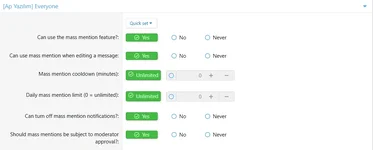
Toplu bahsetme özelliğini hangi kullanıcı gruplarının kullanabileceğini XenForo'nun izin sistemi üzerinden belirleyebilirsiniz. Ayrıca mesaj düzenleme sırasında toplu bahsetme kullanma iznini ayrı olarak yönetebilirsiniz. Moderatör Onay Sistemi
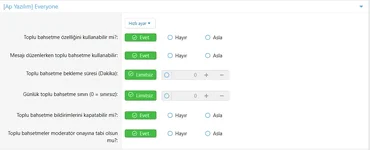
Toplu bahsetme yetkisini kontrollü şekilde dağıtın. Belirli kullanıcı gruplarının gerçekleştirdiği işlemleri moderatör onayına tabi tutarak toplu bildirimlerin kontrolsüz kullanılmasını önleyebilirsiniz. Onay bekleyen işlemler için kullanıcı başına bekleyen mesaj sınırı belirleyebilirsiniz. Bekleme Süresi ve Günlük Kullanım Sınırı
Kullanıcıların toplu bahsetme özelliğini kötüye kullanmasını önlemek için bekleme süresi ve günlük kullanım sınırı tanımlayabilirsiniz.- Bekleme süresi: Kullanıcının iki toplu bahsetme işlemi arasında beklemesi gereken süreyi belirler.
- Günlük sınır: Kullanıcının 24 saat içinde gerçekleştirebileceği toplu bahsetme sayısını sınırlar.
- Bekleyen mesaj sınırı: Moderatör onayı gereken kullanıcıların aynı anda kaç toplu bahsetme mesajını bekletebileceğini belirler.
 Site İçi Bildirim Desteği
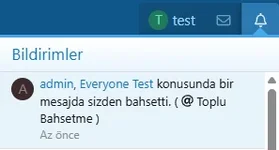
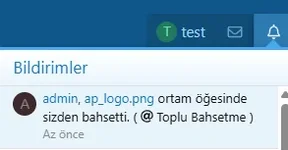
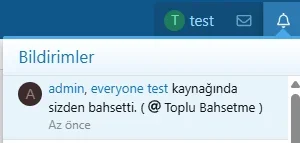
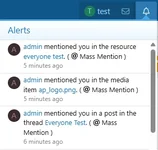
Toplu bahsetme işleminde hedeflenen kullanıcılara XenForo'nun standart bildirim sistemi üzerinden bildirim gönderilmesini sağlayabilirsiniz. Bildirimler, forumun sağ üst bölümündeki bildirim alanında görüntülenebilir. E-Posta Bildirimleri
Toplu bahsetme işlemlerinde kullanıcılara e-posta bildirimi gönderilmesini etkinleştirebilirsiniz. Bu özellik sayesinde forumu aktif olarak ziyaret etmeyen üyelerin de toplu bahsetme işleminden haberdar olmasını sağlayabilirsiniz. Tarayıcı Anlık Bildirimleri
XenForo'nun Web Push altyapısı üzerinden tarayıcı bildirimlerini etkinleştirebilirsiniz. Bildirimler, gerekli tarayıcı desteğine ve kullanıcı aboneliğine sahip üyeler için çalışır. Forumlara Özel Kullanım
Eklentinin hangi forumlarda aktif olacağını yönetici panelinden seçebilirsiniz. Böylece toplu bahsetme özelliğini tüm forumlarda kullanmak yerine yalnızca duyuru, etkinlik veya belirli tartışma alanlarında etkinleştirebilirsiniz. Kaynaklar ve Medya Galerisi Desteği
Eklenti, standart forum mesajlarının yanı sıra XenForo'nun ilgili ek ürünleriyle de entegre çalışabilir.- XenForo Resource Manager (XFRM): Kaynak açıklamaları ve kaynak güncellemeleriyle ilişkili içeriklerde kullanım.
- XenForo Media Gallery (XFMG): Medya öğeleri ve yorumlarıyla ilişkili içeriklerde kullanım.
 Mesaj Düzenleme Desteği
Daha önce yayımlanmış bir mesaja sonradan toplu bahsetme komutu eklendiğinde sistemin nasıl davranacağını belirleyebilirsiniz.Düzenleme sırasında toplu bahsetmeyi tamamen kapatabilir, yalnızca ilgili izne sahip kullanıcılarla sınırlandırabilir veya tüm uygun kullanıcıların bu özelliği kullanmasına izin verebilirsiniz. Böylece mevcut mesajlar üzerinden kontrolsüz bildirim gönderilmesini önleyebilirsiniz.
 Yinelenen Bildirimleri Gruplama
Belirlediğiniz zaman aralığında aynı göndericiden gelen yeni bir toplu bahsetme bildirimi, alıcı tarafından henüz okunmamışsa mevcut bildirimin güncellenmesini sağlayabilirsiniz. Bu özellik, kısa süre içinde tekrarlanan bildirimlerin kullanıcıların bildirim alanını gereksiz yere doldurmasını azaltır. Toplu Bahsetme Bildirimlerini Kapatma
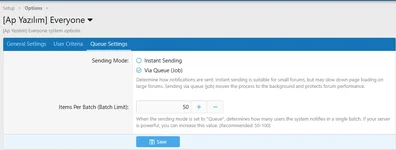
Kullanıcıların kendi hesap tercihleri üzerinden toplu bahsetme bildirimlerini alıp almayacaklarını belirleyebilmelerini sağlayabilirsiniz. Bu özellik, bildirim almak istemeyen üyelerin tercihlerine saygı gösterilmesine yardımcı olur. Kuyruk Tabanlı Bildirim Gönderimi
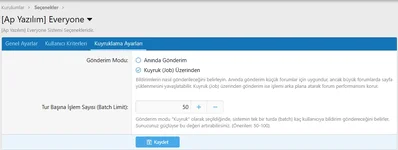
Yüksek kullanıcı sayısına sahip forumlarda toplu bildirimlerin doğrudan sayfa isteği sırasında işlenmesi yerine arka planda yürütülmesini sağlayabilirsiniz.İki farklı gönderim modu bulunur:
- Anında Gönderim: Bildirimler doğrudan işlem sırasında gönderilir. Küçük kullanıcı kitlelerinde tercih edilebilir.
- Kuyruk (Job) Üzerinden Gönderim: Bildirim işlemleri arka plana aktarılır ve belirlenen paket boyutuna göre aşamalı olarak işlenir.
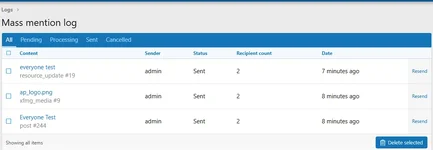
 Toplu Bahsetme İşlem Günlüğü
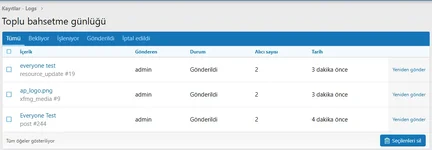
Gerçekleştirilen toplu bahsetme işlemlerini yönetici panelindeki özel günlük ekranından takip edebilirsiniz.Günlük kayıtlarında şu bilgiler görüntülenir:
- İşlemin gerçekleştirildiği konu, kaynak, medya öğesi veya yorum.
- Toplu bahsetme işlemini gerçekleştiren kullanıcı.
- İşlemin mevcut durumu.
- Bildirim gönderilecek kullanıcı sayısı.
- İşlem tarihi.
Nasıl Kullanılır?
Eklenti etkinleştirildikten ve gerekli kullanıcı izinleri tanımlandıktan sonra kullanıcılar, desteklenen editör alanlarında toplu bahsetme komutunu kullanabilir.Örnek kullanım:
Kod:
@everyone

Arkadaşlar, yeni duyurumuzu incelemeyi unutmayın!
Varsayılan komut everyone olarak tanımlanmıştır. Yönetici panelinden farklı bir komut belirlediyseniz örnekteki komutu buna göre değiştirmelisiniz.
Komut, sistemin etkin olduğu ve kullanıcının gerekli izinlere sahip olduğu desteklenen içerik alanlarında işlenir. Bildirimlerin gönderileceği kullanıcılar ise yapılandırılmış hedef kriterlerine, kullanıcı tercihlerine ve diğer uygunluk koşullarına göre belirlenir.
Ayarlar ve Yapılandırma
Eklentinin yönetim seçeneklerine XenForo Admin CP üzerinden erişebilirsiniz. Genel Ayarlar
Admin CP → Seçenekler → [Ap Yazılım] Everyone Kullanıcı Grubu İzinleri
Admin CP → Gruplar ve İzinler → Kullanıcı Grupları İşlem Günlüğü
Admin CP → Günlükler → Toplu bahsetme günlüğü Neden [Ap Yazılım] Everyone?
- Tek komutla toplu bahsetme ve bildirim gönderme imkânı sunar.
- Editör entegrasyonuyla kullanıcıların komutu kolayca kullanmasını sağlar.
- Kullanıcı kriterleriyle hedef kitleyi sınırlandırmaya yardımcı olur.
- Bekleme süresi, günlük limit ve moderatör onayı gibi kontroller sunar.
- Site içi, e-posta ve tarayıcı anlık bildirim seçeneklerini destekler.
- Forum, kaynak ve medya galerisi içerikleriyle entegre çalışabilir.
- Kuyruk tabanlı işlem desteğiyle büyük forumlarda daha kontrollü bildirim gönderimi sağlar.
- İşlem günlüğü sayesinde gönderimleri takip etmeyi ve yönetmeyi kolaylaştırır.
- XenForo'nun kullanıcı izinleri ve hesap tercihleriyle bütünleşik çalışır.
- Yönetim seçeneklerini sekmeli ve düzenli bir arayüzde sunar.
XenForo forumunuz için geliştirilen [Ap Yazılım] Everyone is an advanced mass-mention plugin that allows you to mention multiple forum members with a single command and automatically send notifications to selected users. Thanks to its smart autocomplete system integrated into the rich text editor, your users can easily use the @everyone command while composing messages. With its advanced administrative options, you can precisely control which users can use this feature, who receives notifications, which forums it is available in, and how notifications are processed.
Key Features
Mass Mention with a Single Command
Mention a targeted group of users with a single @everyone command. The system processes the message content and automatically generates notifications for eligible users. You can customize the command through the Admin Control Panel to suit your forum's needs. Smart Editor Integration
The smart autocomplete system integrates directly with XenForo's rich text editor. When users type @, a suggestion menu displays the Mass Mention option. Users can simply select this option to insert the command into their message. Customizable Mention Command
Replace the default @everyone command with a custom alternative. For example, you can use @everyone or configure a different command, such as @members, to suit your forum. You can also configure whether the command is case-sensitive. Recipient Count Preview
Display the number of users who will receive notifications before a mass-mention operation is processed. The informational message displayed below the editor helps users understand the scope of their action before submitting a message. Advanced Recipient Filtering
Limit mass notifications to users who meet specific criteria. For example, you can target members who have reached a certain post count or meet other configured user criteria. If no additional criteria are configured, the system can target all users who satisfy the other eligibility requirements. User Group Permissions
Control which user groups can use the mass-mention feature through XenForo's permission system. You can also manage permission to use mass mentions when editing existing messages separately. Moderator Approval System
Keep mass mentions under control by requiring moderator approval for selected user groups. This helps prevent unauthorized or excessive mass notifications. You can also configure the maximum number of pending mass-mention messages allowed per user. Cooldown Period and Daily Usage Limit
Prevent abuse of the mass-mention feature by configuring cooldown periods and daily usage limits.- Cooldown Period: Defines how long a user must wait between mass-mention operations.
- Daily Limit: Restricts the number of mass-mention operations a user can perform within a 24-hour period.
- Pending Message Limit: Determines how many mass-mention messages a user can have awaiting moderator approval at the same time.
Native XenForo Notifications
Send notifications to eligible recipients through XenForo's standard notification system. Notifications can appear in the forum's notification menu, helping members stay informed about relevant announcements and discussions. Email Notifications
Enable email notifications for mass-mention operations. This allows members who do not regularly visit your forum to stay informed about relevant messages. Browser Push Notifications
Enable browser push notifications through XenForo's Web Push infrastructure. This feature works for users with supported browsers who have granted the necessary notification permissions and subscribed to push notifications. Forum-Specific Availability
Choose which forums can use the mass-mention feature. Instead of enabling it across your entire forum, you can restrict its availability to specific areas, such as announcement forums, event discussions, or selected discussion categories. Resource Manager and Media Gallery Support
In addition to standard forum messages, the plugin can integrate with supported XenForo add-ons.- XenForo Resource Manager (XFRM): Supports use in relevant resource-related content.
- XenForo Media Gallery (XFMG): Supports use in relevant media items and comments.
Message Editing Support
Control how the system behaves when a mass-mention command is added to an existing message during editing.You can disable mass mentions during editing, restrict their use to users with the appropriate permissions, or allow all otherwise eligible users to use the feature. This helps prevent uncontrolled notifications from being triggered through message edits.
Duplicate Notification Grouping
Configure a time interval during which a new mass-mention notification from the same sender can update an existing unread notification for the recipient. This helps reduce notification clutter when multiple mass mentions are sent within a short period. Disable Mass-Mention Notifications
Allow users to control whether they receive mass-mention notifications through their account preferences. This gives members greater control over their notification experience. Queue-Based Notification Processing
On forums with large user bases, mass notifications can be processed in the background instead of being handled entirely during the page request.Two processing modes are available:
- Immediate Processing: Notifications are processed directly during the operation. This may be suitable for smaller recipient groups.
- Queue-Based Processing: Notification tasks are added to the background job queue and processed in batches.
Mass-Mention Activity Log
Track mass-mention operations through a dedicated administrative log.The log includes information such as:
- The associated thread, resource, media item, or comment.
- The user who initiated the mass mention.
- The current operation status.
- The number of intended notification recipients.
- The operation date.
How to Use
Once the plugin is enabled and the required user permissions have been configured, users can use the mass-mention command in supported editor areas.Example:
Kod:
@everyone

Everyone, please take a moment to review our new announcement!
The default command is everyone. If you configure a different command through the Admin Control Panel, update the example accordingly.
The command is processed only in supported content areas where the system is enabled and the user has the required permissions. Notification recipients are determined by the configured targeting criteria, user preferences, and other eligibility conditions.
Settings and Configuration
Manage the plugin through the XenForo Admin Control Panel. General Settings
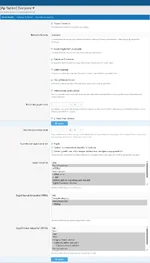
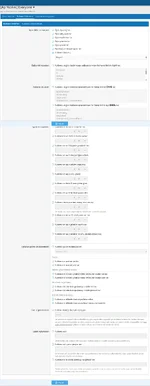
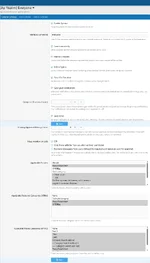
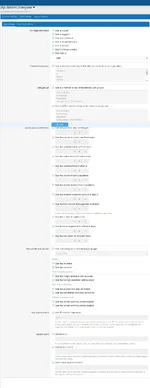
Admin → Options → [Ap Yazılım] EveryoneConfigure the plugin's general settings and available notification options.
User Group Permissions
Admin → Groups & Permissions → User GroupsConfigure which user groups can use mass mentions, manage editing permissions, control notification preferences, and define usage restrictions.
Activity Log
Admin → Logs → Mass Mention LogReview mass-mention operations and monitor their status through the administrative logging interface.
Why Choose [Ap Yazılım] Everyone?
- Mention multiple users and send notifications with a single command.
- Make mass mentions easier with rich text editor autocomplete integration.
- Restrict recipients using configurable user criteria.
- Prevent abuse with cooldown periods, daily limits, and moderator approval.
- Support site notifications, email notifications, and browser push notifications.
- Integrate with XenForo forum content, Resource Manager, and Media Gallery.
- Process large notification operations through the background job queue.
- Monitor mass-mention activity through a dedicated administrative log.
- Integrate with XenForo's user permissions and account preferences.
- Manage the plugin through an organized administrative interface.

XenForo 2 Arşivden ve manuel eklenti nasıl kurulur, nasıl güncellenir?
XenForo 2 için bir eklenti nasıl kurulur, nasıl güncellenir sorusuna bu kaynakta sizlere anlatmaya çalışacağım.Arşiv olarak eklenti yüklene bilmesi için config.php izni nasıl verilir?
Eğer sisteminiz etkin değil ise görselde gördüğünü hatayı alacaksınız.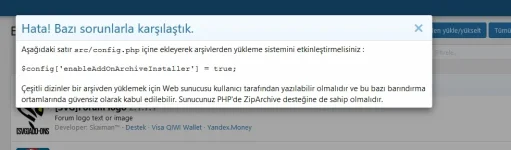
Eğer sunucunuzda
ZipArchive modülü yüklü ve etkin ise FTP/SRC/config.php açın ve en alt satırına aşağıdaki satırı ekleyin;$config['enableAddOnArchiveInstaller'] = true;Eğer hostunuzda ZipArchive modülü etkine değil ise şuna benzer...
![[Ap Yazılım] Everyone](/data/resource_icons/0/80.jpg?1793340533)
@all

![[Ap Yazılım] Core Library](/data/resource_icons/0/53.jpg?1774788910)
![[Ap Yazılım] E-posta Sağlayıcı Yönetimi](/data/resource_icons/0/75.jpg?1792519812)
![[Ap Yazılım] Category Search – English Patch](/data/resource_icons/0/48.jpg?1768454605)
